 Nature GO
Nature GO
How to identify an animal from a photo or a video
Point an animal identifier app at the animal, keep it sharp and in frame, and the app suggests a species you then check yourself. Most apps work from a single photo. Nature GO works from an eight-second video filmed live in the app: the service checks four frames and the movement, then suggests a species for birds, insects, mammals, plants and more.
 Scan with your phone to install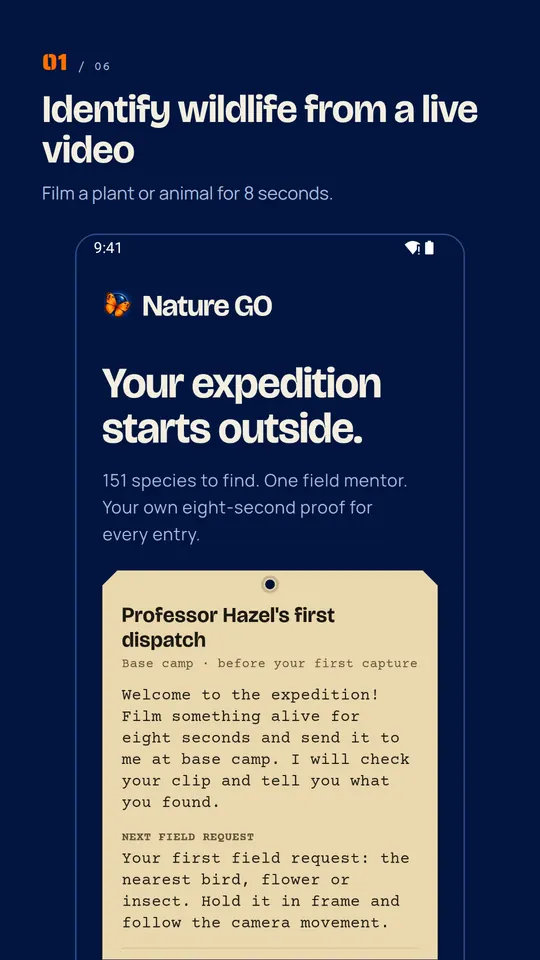
What makes an identification reliable
- Get the whole subject in frame. Wings, legs, leaf shape and colour pattern are what an identifier compares. A cropped tail or a blur of feathers gives a weak answer.
- Steady and close, without disturbing. Move closer slowly, or zoom, and keep a respectful distance from wildlife.
- Several angles beat one shot. This is why Nature GO films eight seconds and asks for a short camera movement: four frames from different moments say more than one photo.
- Check the suggestion. Compare it with the reference photo and the field mark before you accept it. Any identifier can be wrong.
Photo apps and Nature GO: the difference
A photo identifier answers a question about one picture, which can come from your gallery or from the internet. Nature GO only accepts video filmed live in the app, so every entry in your catalogue is something you actually found. Each verified capture fills one of 151 widespread species, sorted into five drawers: Birds, Plants, Insects, Mammals and Others. Finds outside the list go to Beyond the 151.
After an analysis, Professor Hazel, the AI field mentor of the app, can add a field note about your find and a next species to look for. She is always labelled as an AI and she can be wrong.
Never use an identification to decide what is edible
An identification is a suggestion, not a guarantee. Do not use any app, Nature GO included, to decide whether a plant, a fungus or an animal is safe to eat or to touch.
Nature GO at a glance
- Publisher
- IVRYN.
- Price
- Free, with 3 analyses a day. Optional Nature GO Plus: 10 analyses a day while the service has capacity, 30, 90 and 365-day field reports and a text export.
- Account
- None to create. Notes and place labels stay on your phone.
- Android
- Version 1.12.4 on Google Play, updated October 23, 2026.
- iPhone
- Not on the App Store (checked October 23, 2026). A public beta is open on TestFlight.
- Catalogue
- 151 species in 5 drawers: 42 birds, 45 plants, 34 insects, 15 mammals and 15 others (frogs, lizards, snails, spiders, fungi).
- Method
- A live video of about 8 seconds filmed in the app while you move the phone left or right as asked. The server checks 4 frames, then suggests a species. Gallery photos are refused.
- Languages
- App in 10 languages: English, French, Spanish, German, Italian, Portuguese, Japanese, Korean, Russian and Polish.
- Safety
- Never says whether a plant, fungus or animal is edible, venomous or safe.
Facts read on October 23, 2026 on Google Play, the App Store and in the app code.
FAQ
Can Nature GO identify an animal from a photo in my gallery?
No. Nature GO only works from an eight-second video filmed live in the app. Gallery photos and imported files are not accepted.
Is Nature GO free?
Yes, the core features are free, with 3 Professor Hazel analyses a day. Nature GO Plus raises that to 10 a day and adds 30, 90 and 365-day field reports and a text export.
Which animals can it identify?
Birds, insects, mammals, plants and others such as frogs, lizards, snails, spiders and fungi. The catalogue holds 151 widespread species, and other finds go to Beyond the 151.
Does it need an internet connection?
Yes. The identification runs on a server, so it needs a connection. It can be inconclusive and may pause when analysis limits are reached.